Before you start, prepare these:
✅ Passport
✅ International bank card (Visa / Mastercard / JCB / Discover)
✅ Phone number that can receive SMS
✅ Latest version of Alipay
Frequently Asked Questions
Can I use Alipay before arriving in China?
Yes.
You can register and add your card before departure.
What can foreigners do with Alipay?
✅ Pay restaurants
✅ Pay shops
✅ Take taxis
✅ Buy tickets
✅ Pay tourist attractions
Not supported:
❌ Transfer money
❌ Send red packets
❌ Pay personal QR codes
Do I need a Chinese bank account?
No.
International cards are supported.
Can I pay a friend with Alipay?
No.
Foreign cards are mainly for merchant payments.
Can I scan personal QR codes?
Usually no.
You can only pay merchant QR codes.
Can I transfer money?
Generally no.
Can I use a debit card?
Usually yes.
But some overseas banks charge extra fees.
Why is my payment declined?
✔ Wrong billing address(Use the address linked to your bank card, not your hotel or travel address.)
✔ Bank declined transaction
✔ SMS verification failed(Your first payment may require extra verification from your bank. The process is usually: SMS code → Open verification page → Approve payment. If you do not complete the authentication process, your payment will fail. Do not close the verification page before approval is completed. )
✔ Temporary risk control
✔ Merchant doesn’t support foreign cards
✔ Internet problem
✔ Card requires 3D Secure authentication
✔ Card limit reached
I cannot receive SMS verification codes. What should I do?
Check:
✔ Your phone signal
✔ International roaming
✔ SIM card status
If your phone number cannot receive verification SMS while traveling, a China eSIM can provide reliable internet access in China.
[China eSIM Setup Guide]
How to Register Alipay as a Foreigner
Step 1: Download Alipay
Download the official Alipay app from your phone’s app store.
Open the app and select:
Sign Up → Select Country/Region → Enter Phone Number
Step 2: Create Your Account
Enter your phone number and complete SMS verification.
Foreign phone numbers are supported.
Step 3: Complete Identity Verification
Go to:
Account → Settings → Identity Verification
Select:
Passport
Upload:
- Passport photo page
- Required personal information
(If you plan to spend more than 200 RMB at a time, complete identity verification before your trip.)
Step 4: Add Your International Bank Card
Go to:
Me → Bank Cards → Add Card
Supported cards usually include:
- Visa
- Mastercard
Enter your card information and complete verification.
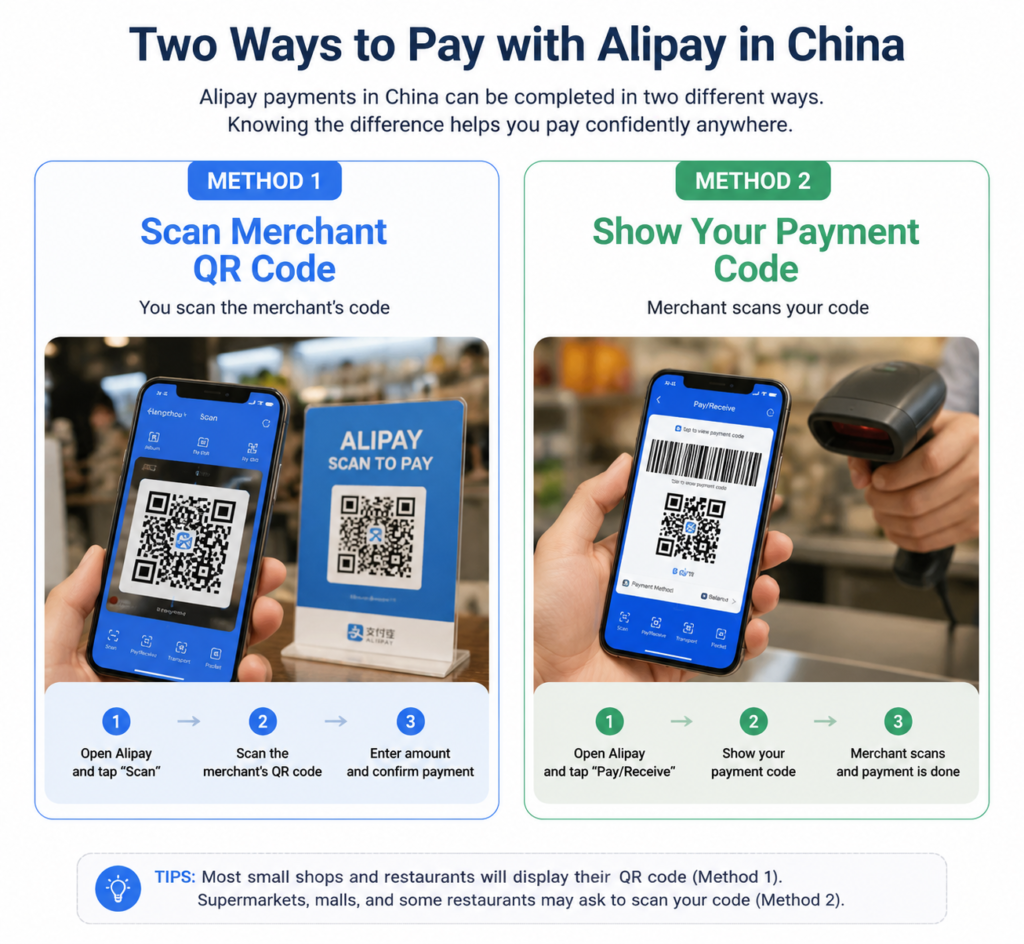
Step 5: Start Using Alipay in China
You can now use Alipay for:
- QR code payments
- Restaurant payments
- Shopping
- Transportation
- Tourist services
Tips Before Traveling to China
1. Prepare Internet Access Before Arrival
Many Chinese apps require internet access during registration and daily use.
A China eSIM allows you to connect immediately after landing without buying a physical SIM card.
Related guides:
[Best China eSIM for Travelers]
[China eSIM Setup Guide]
2. Install Important Apps Before Your Trip
Recommended apps:
- Alipay
- Amap (Gaode Map)
- Translation apps
- Airline and hotel apps
3. Carry a Backup Payment Method
Although mobile payment is widely used, keep:
- A small amount of cash
- A backup international card
for emergencies.
Common Alipay Problems
“Overseas payment is only available for verified users from China Mainland”
Solution:
- Complete passport verification
- Check whether your international card supports overseas payments
Unable to receive verification code
Solution:
- Check your phone signal
- Keep your original SIM card active
- Confirm international roaming is enabled
Payment failed
Check:
- Card information
- Bank restrictions
- Alipay verification status
Using Alipay is one of the first steps for foreigners traveling to China. Registering before arrival, preparing internet access with an eSIM, and completing identity verification in advance can make your trip much smoother.